Instant digital delivery · Secure Stripe & Etsy checkout · One-time purchase

ProFormaGRID

Design Studio Procurement Center

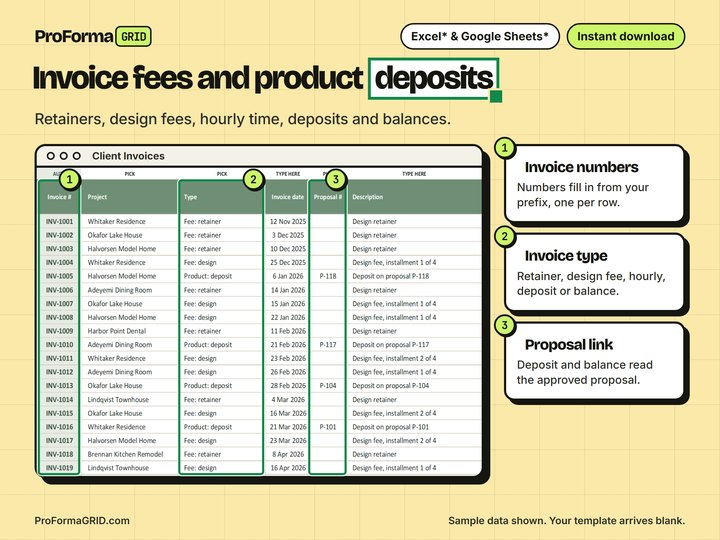
Proposals, purchase orders and invoices from one FF&E schedule

Each item is typed once on the master schedule, then tagged to a proposal, a purchase order and an invoice. The workbook works out client prices and margin, deposits and balances, invoice aging, order-by dates, storage, fee hours against budget and where the studio is paying vendors before the client has paid.

Edition

Solo editionOne designer · Interior Design FFE Tracker$14.99Studio edition2 to 12 designers$69.99
$69.99USD
One-time paymentDigital download

Excel* & Google Sheets*

  • One 2,000-line FF&E schedule feeds proposals, purchase orders and client invoices
  • Margin, invoice aging, cash floated and fee hours against budget for up to 40 projects
  • Late items, receiving, storage and claims, plus a vendor scorecard from your own orders
  • A team view for 2 to 12 designers and client pages that never show trade costs
Explore the workbook ↓

Why you'll love working in this template

Set up the studio, team, numbering and pricing on Settings & Team, then vendors and projects. Add items to the FF&E Master Schedule, tag them to a proposal and print it for the client. When it is signed, invoice the deposit, place POs and log payments and time as they happen. Each week, check the Studio Dashboard, Lead Times & Late Items and Budget vs Actual.

Jump to any worksheet

01 Studio Dashboard

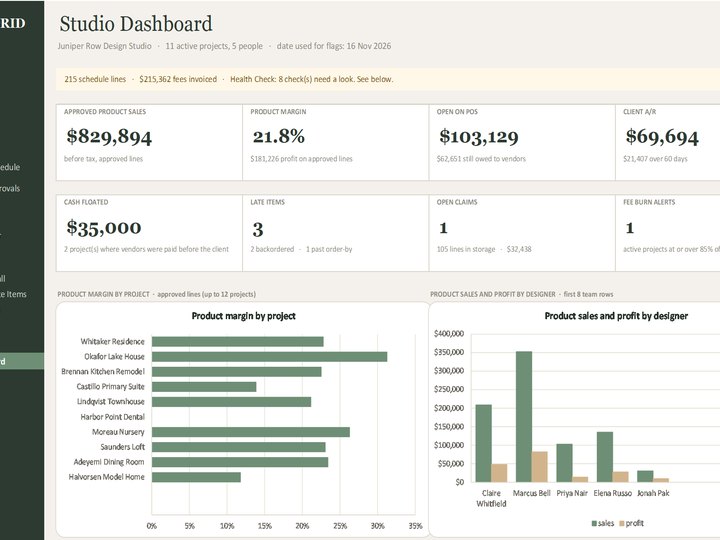
See what needs the studio first

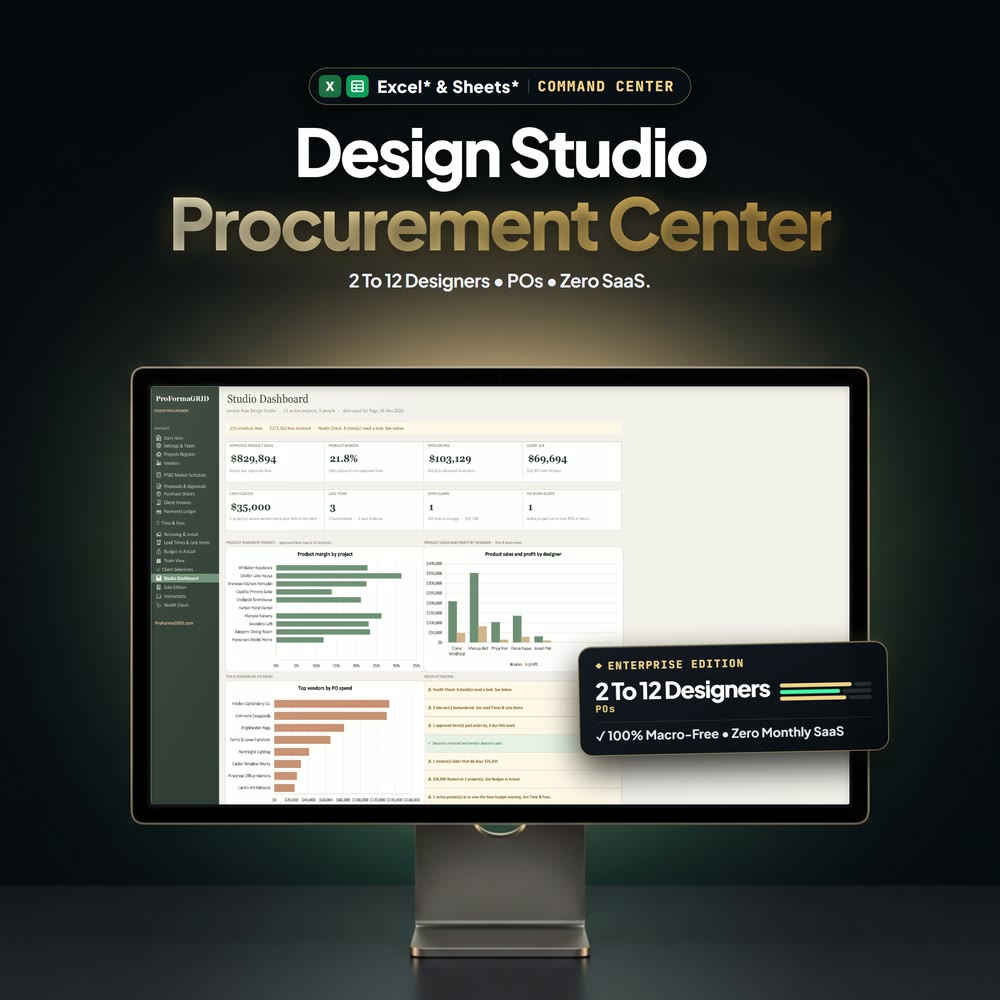
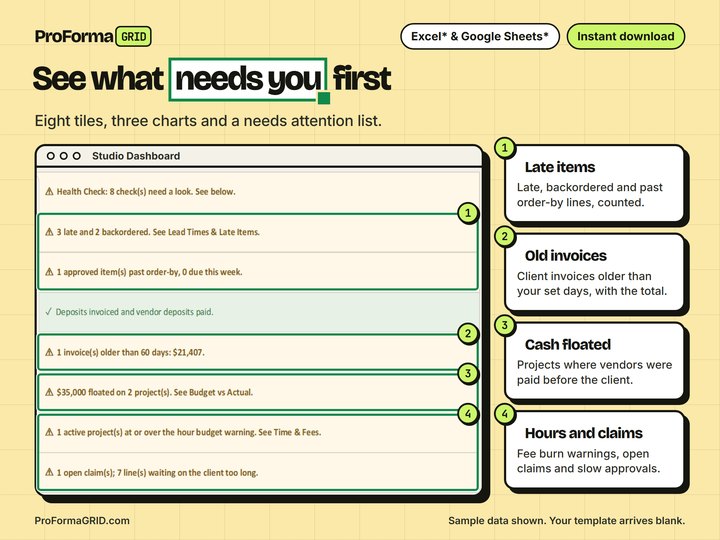
Approved product sales, margin, open POs, client A/R, cash floated, late items, open claims and fee burn alerts, with charts by project, designer and vendor and a needs-attention list.

02 Proposals & Approvals

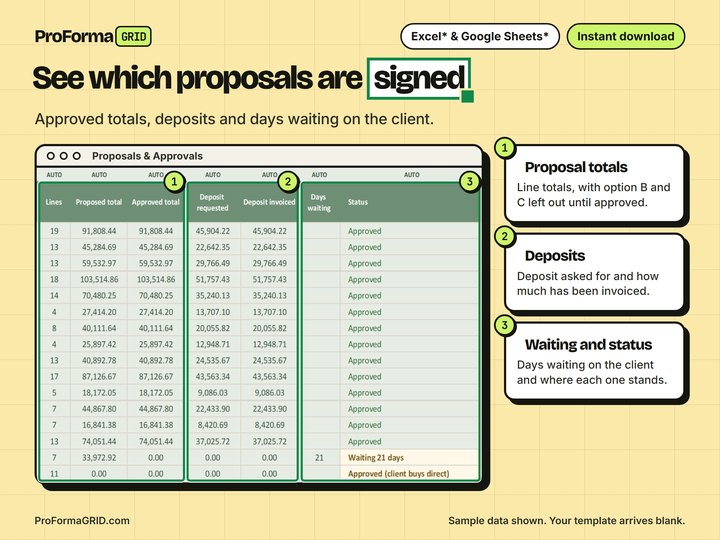
Numbered proposals and what is signed

One row per proposal with lines, proposed and approved totals, deposit requested and invoiced, days waiting on the client and a status, plus a printable client-safe proposal.

03 Budget vs Actual

Where each project's money stands

Budget, proposed, approved, committed on POs, invoiced and collected for every project, with product margin, net result, cash position and flags for floating cash, fee hours and over-budget projects.

04 Time & Fees

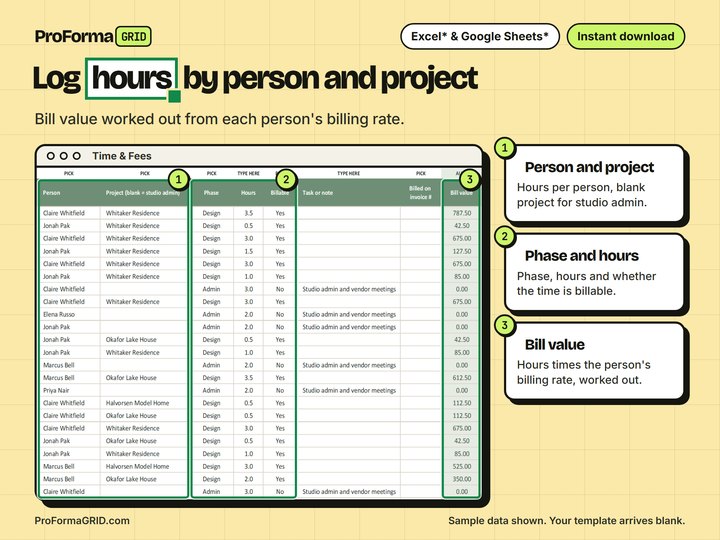
Hours by person and project

Log time by person, project and phase. Bill value comes from each person's billing rate, and each project's hours are checked against its hour budget with a warning at the share you set.

Design Studio Procurement Center, screen by screen

$69.99USD

Inside the workbook

19 pre-built, interconnected worksheets included in both Excel* and Google Sheets*.

  • Start Here
  • Settings & Team
  • Projects Register
  • Vendors
  • FF&E Master Schedule
  • Proposals & Approvals
  • Purchase Orders
  • Client Invoices
  • Payments Ledger
  • Time & Fees
  • Receiving & Install
  • Lead Times & Late Items
  • Budget vs Actual
  • Team View
  • Client Selections
  • Studio Dashboard
  • Solo Edition
  • Instructions
  • Health Check

Everything included in your download

Excel* & Google Sheets* digital bundle — ready for instant use

  • DesignStudioProcurementCenter-Excel.xlsx
  • GoogleSheetsDownloadLink.pdf
  • Instructions.pdf

Instant digital download: your Microsoft Excel* (.xlsx) workbook, a one-click Google Sheets* copy link PDF and a step-by-step instructions PDF.

$69.99USD

Frequently asked questions

Contact support ↗
How big a studio does it hold?

2 to 12 team members and up to 40 projects, 150 vendors, 2,000 schedule lines, 300 proposals, 400 purchase orders, 400 invoices, 1,000 payments and 1,500 time entries in one file.

Does it send orders or take payments?

No. It prints proposals, purchase orders and invoices for you to send, and tracks what you log. It does not send anything, take payments or replace your accounting software, and it is not tax advice.

How does it handle sales tax?

You type each project's rate and set the taxable switches for product, freight, receiving, install and fees with your accountant. Rules vary by state, and no rates are built in.

Is there a version for one designer?

Yes. The Interior Design FFE Tracker is the one-designer edition for up to 5 projects, with the FF&E schedule, room budgets, client selections, payments and a dashboard. The Solo Edition tab inside this workbook shows it.

What spreadsheet software does the Design Studio Procurement Center work with?

The Design Studio Procurement Center includes ready-to-use files for both Excel & Google Sheets. Every formula, chart, dashboard, and all 19 connected worksheets (Start Here, Settings & Team, Projects Register, Vendors, FF&E Master Schedule, Proposals & Approvals, Purchase Orders, Client Invoices, Payments Ledger, Time & Fees, Receiving & Install, Lead Times & Late Items, Budget vs Actual, Team View, Client Selections, Studio Dashboard, Solo Edition, Instructions, Health Check) are pre-built and ready the moment you open your file.

Who is the Design Studio Procurement Center built for?

Professionals, business owners, and individuals looking for a ready-to-use design studio procurement center in Microsoft Excel and Google Sheets. Set up the studio, team, numbering and pricing on Settings & Team, then vendors and projects. Add items to the FF&E Master Schedule, tag them to a proposal and print it for the client. When it is signed, invoice the deposit, place POs and log payments and time as they happen. Each week, check the Studio Dashboard, Lead Times & Late Items and Budget vs Actual.

Is the Design Studio Procurement Center a one-time purchase or a subscription?

It is a 100% one-time purchase ($69.99 USD) with lifetime personal or internal business use — zero recurring subscription fees, zero locked cells, and no add-ons required.

How fast do I receive my files after checkout?

Immediately. Your download links appear right on your private order confirmation page seconds after checkout via credit card, Apple Pay, or Google Pay. Bookmark your order page to re-download anytime.
Purchase information ↗

Design Studio Procurement Center

$69.99USD

Excel*, Google Sheets* and YouTube* are trademarks of their respective owners.

Related templates

Zoom in to read the details. Drag to move.